

Your WooCommerce shop is running. But is your inventory logic?
WooCommerce comes with an integrated inventory feature. For many online stores, this is sufficient.
As long as there is one warehouse, one sales channel, and no complex reservation or branch processes, the system works reliably.
However, as soon as multiple locations, a physical store, or parallel sales processes are added, “Show stock” becomes a real WooCommerce inventory management system.
And this is exactly where the structural limits begin.
Table of contents
What many understand by “WooCommerce inventory management”
When searching for “WooCommerce inventory management,” many initially think:
- Enter stock in the backend
- Display stock status (“In stock”, “Out of stock”)
- automatic inventory reduction upon ordering
- Manage variant inventory
For simple online shops, this is sufficient. WooCommerce can:
- Maintain inventory per product or variant
- Define minimum stock
- Trigger notifications for low stock levels
- Reduce inventory when selling
In this context, WooCommerce stock management means:
Inventory management at the product level within the shop.
That is functionally correct – but structurally limited.
How WooCommerce inventory management works by default
In the standard model, WooCommerce manages stock at the product level.
File is maintained as:
SKU → Stock Inventory
Optionally complemented by variants (e.g. size, color).
When an order is placed, WooCommerce reduces the stock – depending on the setting:
- directly at checkout
- or only after payment
- or manual
The system recognizes:
- no location
- no branch logic
- no separate reservations
- no routing decision
WooCommerce is, in its basic logic, a single-warehouse system.
For pure online shops, this is sufficient.
For chain stores or hybrid retailers, it is not.
Typical Myths About WooCommerce Inventory Management
Myth 1: “A plugin makes WooCommerce multi-warehouse capable.”
Many plugins add fields or forms for multiple warehouses.
But often the data model remains unchanged:
- File will continue to be decided globally.
- Location is an additional attribute, not a primary dimension.
Multi-store is not a UI problem. It is a structural problem.
Myth 2: “Stock Management is the same as Inventory Management.”
“Stock” means: increase or decrease a number.
“Inventory” means: modeling transactions.
A real WooCommerce inventory management in branch operations differentiates at least:
- onhand
- onhand
- available
- optional in_transit
Without this separation, conflicts arise in parallel sales.
Myth 3: “WooCommerce can already do that – you just have to configure it correctly.”
Configuration changes settings.
Architecture changes responsibilities.
If the shop itself decides how inventory is reduced, it remains the central inventory body.
This is risky with increasing complexity.
When WooCommerce Inventory Management Reaches Its Limits
The problems do not arise from missing features, but from a lack of structure.
1. WooCommerce multiple warehouses and branches: Why this is not a configuration problem
As soon as inventory is no longer global but must be managed by location, the standard model is no longer sufficient.
Needed:
- File per branch
- Location-based availability
- Online selection of a pickup store
- Separate negative inventories
- Local Inventories
However, WooCommerce only knows one global stock value.
“WooCommerce multiple warehouses” is therefore not a configuration problem, but an architectural problem.
2. Online + POS (Hybrid Retail)
In the branch operation, you sell:
- online
- at the checkout
- parallel
This increases the likelihood of conflict:
- Two sales at the same time
- Online reservation during POS sale
- Payment process is aborted
- Cash register system temporarily offline
A robust WooCommerce inventory management must therefore differentiate between:
- onhand
- onhand
- available
And it must process transactions atomically.
The standard WooCommerce mechanism simply reduces “stock”.
Does not model reservation logic with TTL, commit, or release.
Reservations and overselling
A common mistake in simple setups:
- Inventory is only reduced after payment.
- Two customers start the checkout at the same time.
- One pays faster.
- The second one receives a cancellation later.
This is not a UX problem.
This is a missing reservation mechanism.
Real inventory logic works with:
- temporary reservations
- Time limits
- Commit upon payment
- automatic release in case of cancellation
Without this structure, the risk of overselling increases with parallel transactions.
Routing and fulfillment decisions
With multiple locations, an additional question arises:
Which branch fulfills the order?
Possible rules:
- nearest location
- Location with inventory
- Prioritization central warehouse
- Utilization logic
- Cost optimization
WooCommerce does not recognize this dimension.
Plugins partially simulate it – but do not solve the underlying structural problem.
Why a plugin stack does not replace a warehouse architecture
Many search queries for “WooCommerce warehouse management plugin” or “WooCommerce inventory plugin” aim for quick extensions.
The problem:
Plugins extend functions, not the data model.
They mostly work within the WordPress structure:
- File will continue to be decided in the shop.
- File will continue to be decided in the shop.
- Conflict management remains rudimentary.
- Multilayer is often modeled as an additional field, not as a primary dimension.
This leads to increasing complexity when:
- Number of branches grows
- Online volume is increasing
- is integrated into POS
- Transfers between locations become necessary
From a certain point, WooCommerce transforms from the shop system into a de facto ERP replacement – without being designed for it.
Comparison: Standard vs. Plugin vs. Architecture
| Criterion | Standard WooCommerce | Plugin extension | Architectural Solution |
| Multiple warehouses | ✗ | restricted | ✓ |
| Location-based reservation | ✗ | rarely | ✓ |
| Routing Logic | ✗ | restricted | ✓ |
| Offline POS capability | ✗ | mostly no | ✓ |
| Ledger/Audit capability | ✗ | no | ✓ |
| Transaction security | low | medium | high |
| Documentation | limited | limited | high |
The differences do not lie in the functionality, but in the structural approach.
WooCommerce Inventory Management as an Architecture Question
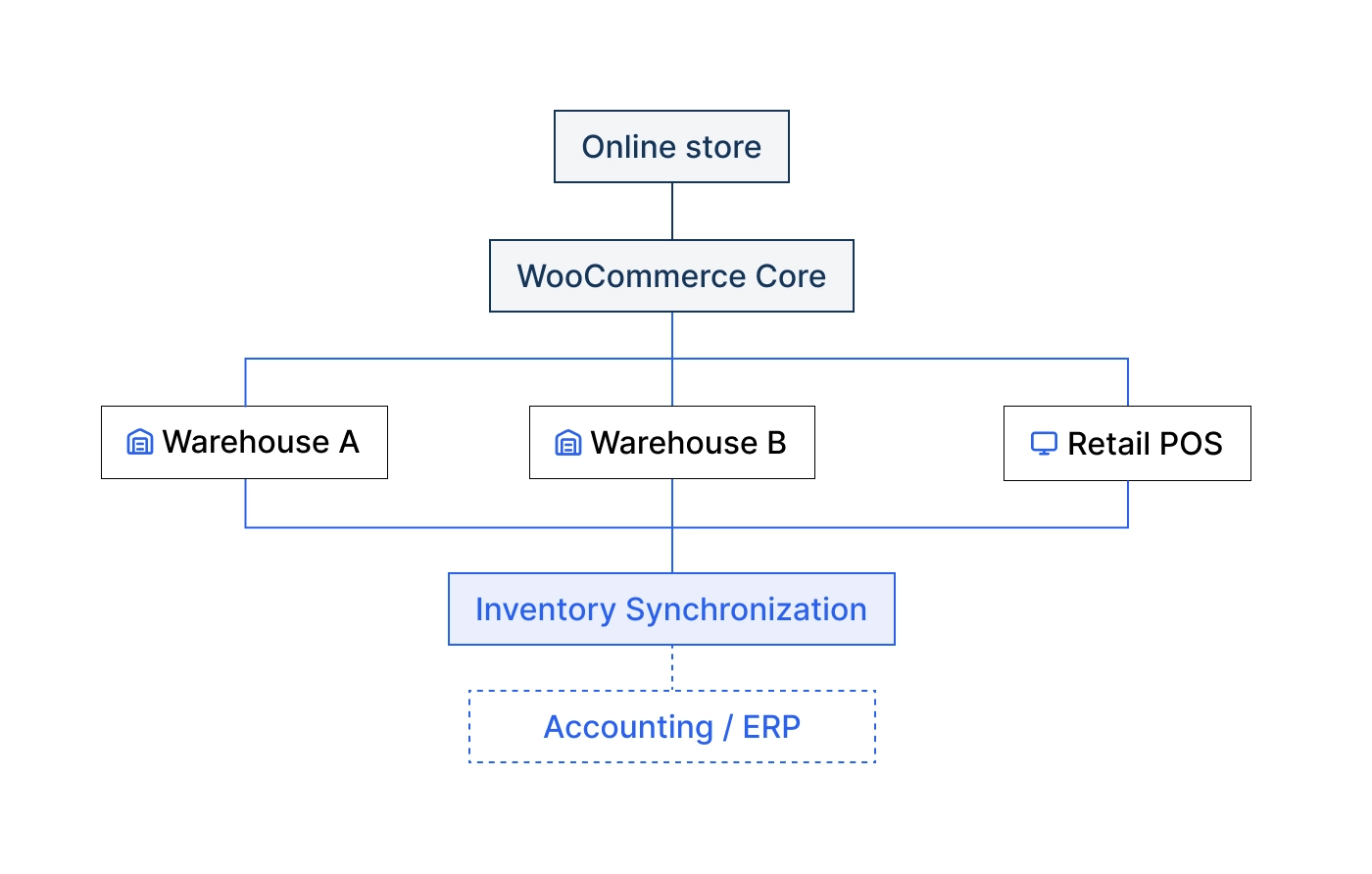
A reliable WooCommerce inventory management system in branch operations requires:
- Central Inventory-Truth for SKU × Location
- Separation of order system and inventory decision
- Append-only ledger for auditability
- Materialized snapshots for performance
- Idempotent commands to avoid double bookings
- Location-based reservations
- Multidimensional status management (onhand, reserved, in_transit)
- Reconciliation mechanisms
- Monitoring and Exception Handling
This is not a plugin feature.
This is a system architecture.
WooCommerce remains committed to:
- Catalog system
- Checkout-Frontend
- Order management
The inventory logic is located in a central inventory service.
Multi-warehouse capability: What real WooCommerce inventory management must deliver
In medium-sized businesses, multiple warehouses do not just mean “two numbers instead of one.”
Required are, among other things:
- Location-based minimum stocks
- Safety stocks per branch
- automatic warnings when falling below
- Click & Collect with location restriction
- Transfer processes with in-transit status
- location-based inventories
- Reporting by Branch
- isolated negative inventories
- clean returns handling per location
Only then does a reliable multi-channel matrix emerge:
| Dimension | Necessary |
| SKU | ✓ |
| Location | ✓ |
| Channel (POS/Online) | ✓ |
| Status (onhand/reserved/in_transit) | ✓ |
That is WooCommerce inventory management in the systemic sense.
Decision framework: When is what sufficient?
Standard WooCommerce is sufficient if:
- only one warehouse exists
- no stationary sale
- low parallelism
- no Click & Collect
- no transfers
Plugin solution may be sufficient if:
- two warehouses are managed
- no complex reservation logic is necessary
- no offline POS exists
- Transaction conflicts are rare
Architecture solution is necessary when:
- several branches exist
- Online + POS run in parallel
- Reservations must be transaction secure
- Routing logic required
- Transfers and in-transit inventories are modeled
- Reporting required per location
- negative inventories must be isolated
Here, WooCommerce inventory management becomes a system decision.
FAQ – Frequently Asked Questions about WooCommerce Inventory Management
Can WooCommerce manage multiple warehouses?
Not by default. WooCommerce only knows a single global inventory per SKU. Multi-warehouse capability requires structural extensions.
How does the standard inventory management work in WooCommerce?
WooCommerce reduces the stock per product or variant upon order. There is no native location or reservation logic.
What is the difference between Stock and Inventory?
Stock describes a number.
Inventory describes a transaction logic with status, location, and process control.
When is a plugin no longer sufficient?
When parallel sales, multiple locations, routing decisions, or transaction-secure reservations are required.
Is WooCommerce an ERP system?
No. WooCommerce is a shop system. It can manage inventory but does not replace a distributed inventory or ERP system.
Conclusion
WooCommerce can manage inventory.
But WooCommerce is not a distributed inventory system.
As long as you:
- a location
- a sales channel
- low parallelism
to have, the standard model is sufficient.
However, as soon as branch logic, hybrid retail, or scalable online volume come into play, WooCommerce inventory management becomes an architectural issue.
And architecture does not replace a plugin.
