
WooCommerce POS without middleware and WooCommerce POS without a POS cloud provider. Sooner or later, many WooCommerce store owners ask themselves:
“Why can’t I also use my WooCommerce for inventory management, coupon management, or in-store payments?”
The omnichannel implementation of WooCommerce is a logical step. It not only extends the efficiency of this digital business tool to in-store operations but also ensures, for example, consistent inventory management and a consistent customer experience across all channels.
An extension of WooCommerce—the WordPress-based e-commerce platform—for brick-and-mortar stores is often referred to as “WooCommerce POS” (Point of Sale) and is not necessarily new.
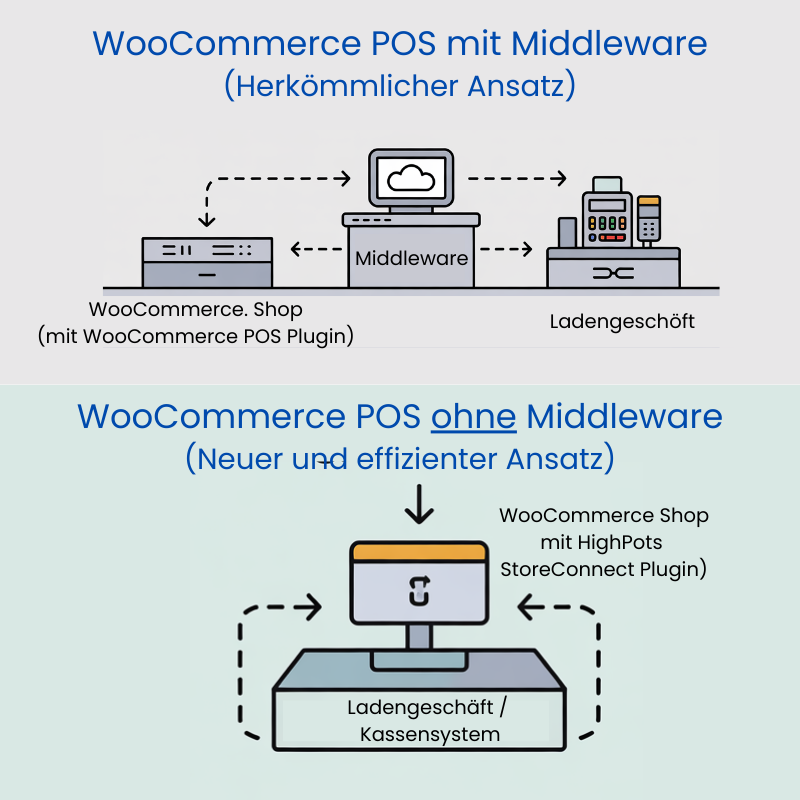
However, traditional POS solutions for WooCommerce have a major drawback: They always require an additional component—known as middleware—between WooCommerce and the in-store IT systems. For you as a retailer, this increases complexity and can quickly negate the efficiency gains achieved through the integration.
After all, in a setup like this, you don’t just need additional hardware, software, and licenses. The complexity and susceptibility to errors involved in synchronizing the data also increase.
But there is an innovative alternative: Our integrated software solution, HighPots StoreConnect, offers you a direct connection between WooCommerce and your brick-and-mortar store—without any intermediate solutions or middleware.
With clear benefits for you. So what really matters when it comes to a WooCommerce POS, and how can you overcome technical implementation hurdles? You’ll find out in this blog post.
What is a WooCommerce POS?

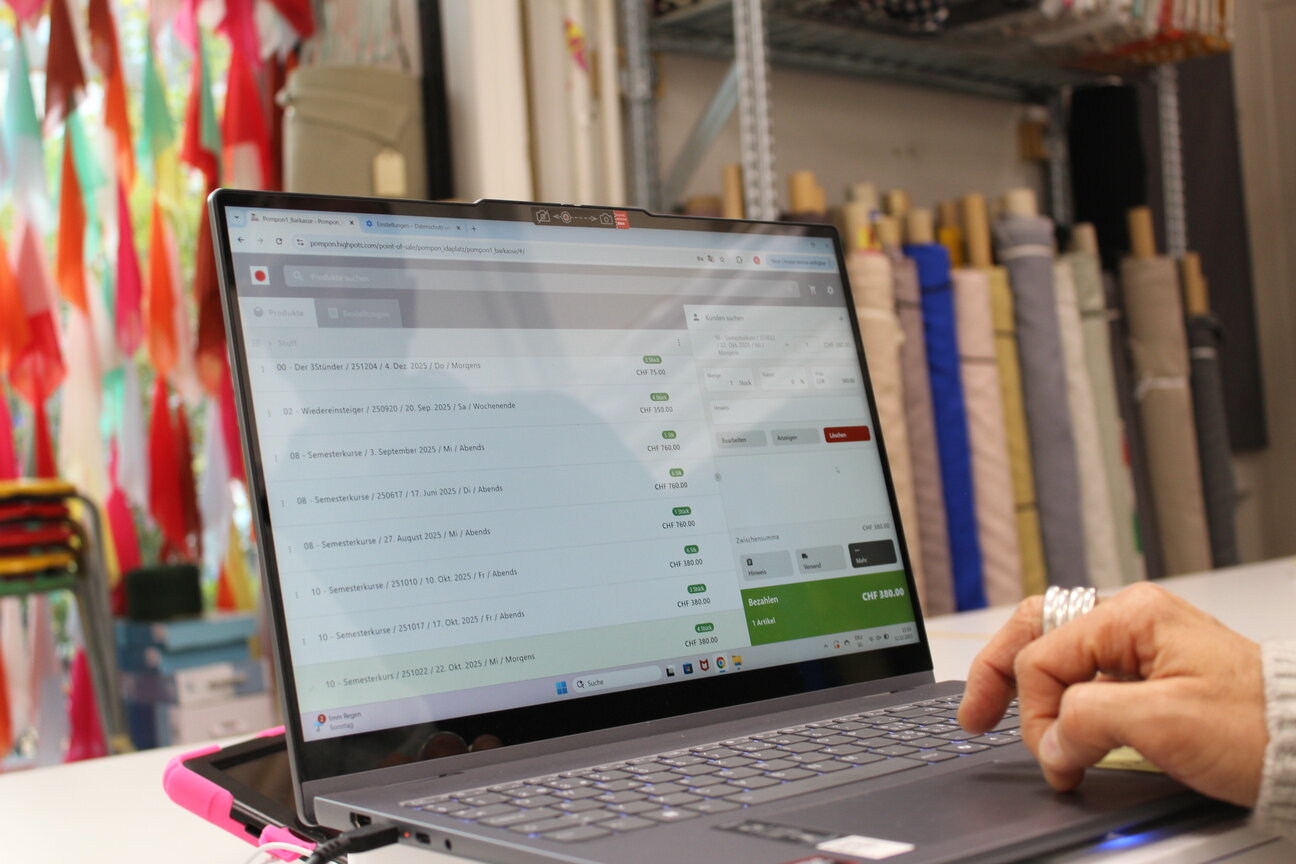
The image shows a product in a brick-and-mortar store, but one that is inventoried and managed in the online store: an example from the fabric store Pompon in Zurich, where customers can request more information about the product using a QR code, for example. A WooCommerce POS bridges the gap between the store and the online shop.
Let’s start by defining what a WooCommerce POS is:
A WooCommerce POS (Point of Sale) is a plugin-based point-of-sale solution that seamlessly connects your WordPress-based online store with a brick-and-mortar retail store.
This integration ensures real-time synchronization of inventory, customer information, and sales data across all sales channels. This lays the foundation for a consistent (omnichannel) shopping experience.
It enables the sale of the same products both online and in-store, often supports common hardware (such as scanners and printers), and also complies with legal requirements (e.g., KassenSichV/GoBD).
Kunden können also in allen Kanälen kaufen.
An example of such a system is HighPots StoreConnect POS.
As a bridge between brick-and-mortar and online retail, choosing the right WooCommerce POS and WooCommerce POS systems is therefore a key decision for merchants with both a brick-and-mortar store and a WooCommerce online store.
In practice, this search almost always leads to cloud-based point-of-sale systems or middleware solutions that simply integrate with WooCommerce.
This raises a more fundamental question:
Why use middleware at all if WooCommerce is already the leading system?
WooCommerce as the Core System for E-commerce
In the e-commerce world, WooCommerce has long since ceased to be used merely as a “store plugin”; instead, it serves as a central system for:
- Product and Variant Management
- Pricing and Tax Logic
- Coupons and Discounts
- Inventory
- Online Sales and Reports
As soon as a brick-and-mortar store is added, the desire arises for:
- a unified inventory management system
- consolidated sales figures (online and offline)
- a joint inventory
- as little additional system complexity as possible
This is where classic WooCommerce POS systems come into play—though usually in a roundabout way.
Warum der marktübliche Ansatz von Cloud-POS und Middleware oft nicht zielführend ist
Many providers rely on an additional cloud layer between WooCommerce and the checkout.
Typical middleware solutions
- Billbee – Middleware for Multichannel and Marketplaces
- SwissPOS – Cloud-Based Point-of-Sale System with WooCommerce Integration
- Additional POS hubs and integration platforms
Common Features of POS Solutions with Middleware
- WooCommerce is not the leading system, but rather an integrated channel
- Sales and inventory data are processed externally
- Continuous synchronization between multiple systems
- Ongoing subscription costs, often based on volume or revenue
This architecture has evolved over time—but it is not necessarily optimal.
The Structural Problem with Middleware in the WooCommerce Environment
Middleware solves integration problems, but creates new dependencies.
Technical Drawbacks of Middleware in WooCommerce POS:
- Additional sources of errors: For example, database errors, software releases, and other factors. On top of that, there is a greater workload involved in supporting all of the tools.
- Synchronization delays: Data is often not transferred between the point-of-sale system and WooCommerce in real time, which can lead to inconsistencies—for example, if the same product, the last one in stock, was ordered in the online store and sold in the physical store at almost the same time
- More complex error analysis: When problems arise, the source of the error must be sought in the point-of-sale system, the middleware, and WooCommerce, which makes the analysis more difficult.
- Dependence on external release cycles: Updates or new features for the POS system or middleware cannot be directly controlled and may lead to compatibility issues.
Economic Disadvantages of Middleware in WooCommerce POS
- Ongoing costs without economies of scale: Even with low revenue, monthly fees are incurred regardless of actual usage.
- Rising fees amid growing revenue: Many middleware providers increase their fees in proportion to sales volume or the number of transactions.
- High total cost of ownership over the long term: The combination of license fees, transaction costs, maintenance, and, if applicable, training adds up over the years.
Data Protection and GDPR Issues When Using Middleware in WooCommerce POS
- External Processing of Sales and Customer Data: Sensitive sales and customer data is routed through a third-party provider and stored there.
- Data Processing Agreements Are Required: Since the data is processed by an external service provider, a data processing agreement (DPA) must be entered into.
- Increased Risks in Data Protection Audits: Compliance with the GDPR must be demonstrated for both the organization’s own system and external service providers, which increases the complexity.
Conclusion: Especially for merchants who already use WooCommerce extensively, this often represents an unnecessary break in architecture.
The modern and streamlined alternative: WooCommerce POS system without middleware
A WooCommerce POS without the cloud and without middleware takes a different approach:
Your online store and point-of-sale system operate on the same database, within the same system.
The Basic Principle of Modern WooCommerce POS with Direct Integration
A modern WooCommerce POS system with a direct connection between the online store and the physical store (such as HighPots StoreConnect) works as follows:
- Your point-of-sale (POS) system is embedded in your WooCommerce website as a local plugin—a key step in integrating the two systems.
- Please perform the installation only on your own WordPress server.
- No data is shared with external providers.
- WooCommerce remains the main system for all your data.
HighPots StoreConnect is a WooCommerce POS system without middleware, designed for merchants who use WooCommerce as their central system.
Architecture of the WooCommerce POS HighPots StoreConnect
Unlike other WooCommerce POS systems, StoreConnect uses a new, streamlined architecture—without middleware:
- StoreConnect is a pure WordPress/WooCommerce plugin—and therefore integrates seamlessly into existing WooCommerce stores: StoreConnect is designed specifically as an extension for your existing WordPress and WooCommerce installation.
- StoreConnect is installed locally—and gives you full control. The WooCommerce POS software is installed directly on your local server (on-premise) or on a hosting server of your choice. You retain full control over your data and the system environment.
- StoreConnect ensures your independence from third-party providers and clouds: The StoreConnect system operates without an external cloud backend from the manufacturer and without dependencies on other third-party providers. You can run it on your own server (on-premise) or on a hosting server of your choice. You retain full control over your data and the system environment.
StoreConnect’s Pricing Model as a WooCommerce POS
Unlike other WooCommerce POS solutions available on the market, HighPOts StoreConnect is not a subscription-based service. This means that with us, you only pay for the one-time customization and setup of the WooCommerce POS to meet the specific needs of your online store and brick-and-mortar location.
Und das heißt:
- No recurring subscription fees: Unlike many cloud-based point-of-sale systems, there are no monthly or annual subscription fees.
- No performance-based costs: There are no revenue- or transaction-based fees that increase as your business grows.
- Long-Term Planning: You benefit from stable, predictable costs, which enable reliable budgeting over an extended period. In addition, we offer you professional, personalized support with quick response times.
Standardized Warehousing and Inventory Management
A common argument in favor of middleware is store logic.
StoreConnect achieves the same goals without synchronization.
For you, this means:
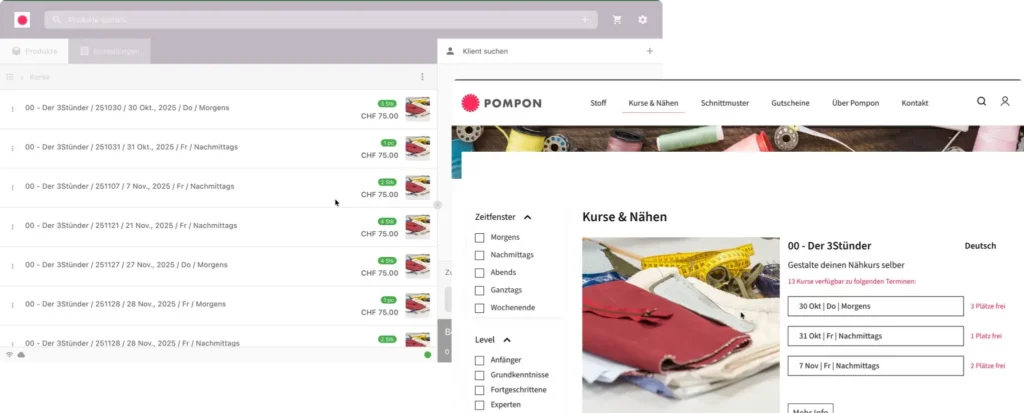
- There is a single inventory pool for all online sales.
- Online sales
- In-Store POS Sales
- Similarly, the same inventory is used for in-store POS sales.
- Central inventory management takes place in a single location: WooCommerce
- The same logic is used for both products and services. The result: one inventory, one system, no data gaps.
The result: one inventory, one system, no data gaps.
Operational Intelligence in Retail—Instead of Merely Collecting Data
As a WooCommerce POS solution, StoreConnect also offers many other possibilities for smart use. For example, the analyses and reports generated by our tool enable you to take targeted actions—both online and in-store.
- Immediate and clear identification of slow-moving items: Quick removal from the lineup is possible
- Identifying particularly successful products: For strategically replenishing inventory or for promotional campaigns
- Suggestions for targeted marketing campaigns, e.g.:
- Clearance sales for slow-moving inventory
- Targeted promotion of top-selling products
The data is based on actual sales figures from both the online store AND the brick-and-mortar store!
Vergleich: Cloud-POS vs. lokales WooCommerce POS System
As you’ve seen, not all WooCommerce POS solutions are created equal. So be sure to check whether your store integration via WooCommerce uses middleware—or is directly integrated, as is the case with HighPots StoreConnect.
The table summarizes the most important differences at a glance:
| Criterion | Cloud-POS / Middleware (z. B. SwissPOS, Billbee) | HighPots StoreConnect |
|---|---|---|
| Architecture | Cloud-based | Local |
| Data storage | Extern | Intern |
| WooCommerce | connected channel | Core System |
| Abo-Kosten | Yes | No |
| Data protection | AVV required | No third-party processor |
| System Complexity | Hoch | Low |
Who is a WooCommerce POS without middleware suitable for?
Now ask yourself: Is a WooCommerce POS without middleware right for me, too?
We at HighPots—with 30 years of experience as IT system developers—have a clear answer for you: Using WooCommerce POS without middleware is worthwhile in many cases—but not in all of them. Here’s our assessment:
This distinction is intentionally clear—not every solution is suitable for every business model.
WooCommerce POS with Direct Integration – Ideal for:
- Retailers using WooCommerce as their primary platform
- Brick-and-mortar stores and online store
- Focus on Data Sovereignty and Cost Control
- GDPR-sensitive companies
WooCommerce POS with Direct Integration – Not ideally suited for:
- Large retail chains with diverse point-of-sale systems
- POS-focused organizations without an online store focus
- Scenarios with Mandatory ERP Clouds
This distinction is intentionally clear—not every solution is suitable for every business model.
But one thing we can say for sure: Even if you’re a retailer who doesn’t yet have an online store, StoreConnect is the perfect way to get started in both worlds. In that case, we’ll begin by developing your online store at a fixed price—and you’ll benefit from a quick or simultaneous integration of your brick-and-mortar store via StoreConnect. Get in touch with us.
WooCommerce POS Case Study: Pompon Zurich
The Pompon fabric store in Zurich serves as a prime example of the successful use of HighPots StoreConnect as a WooCommerce POS solution. By directly integrating WooCommerce with its brick-and-mortar store, the company benefits from centralized inventory management—all with maximum efficiency. Read the case study…
WooCommerce POS: Fewer Systems, More Control
A WooCommerce POS system without middleware is not an exception, but rather a logical consequence when WooCommerce is already at the heart of the business.
HighPots StoreConnect follows this approach directly and consistently as a WooCommerce POS—making it the logical choice for retailers.
StoreConnect shows:
- Retail stores and online shops don’t have to be separate worlds
- Cloud middleware is not a law of nature
- Simple architecture means:
- Geringere Kosten
- Fewer risks
- Consistent Data
If you’re serious about using WooCommerce POS for the long term, you should carefully evaluate this architecture: We recommend contacting us today for a free consultation.
All information about HighPots StoreConnect
More information about integrating the point-of-sale system with WooCommerce
